← Partner Portal help · Leer en español
For employees PREVIEW
How to see your pay, keep your payroll details current and get your W-2, in your employer's portal.
New to the portal? Start with signing in, using the email your employer has on your employee record. Your menu has Home, Paystubs, Tax forms, Messages and Profile. You only see your own pay, and only pay runs your employer has marked paid.
Home
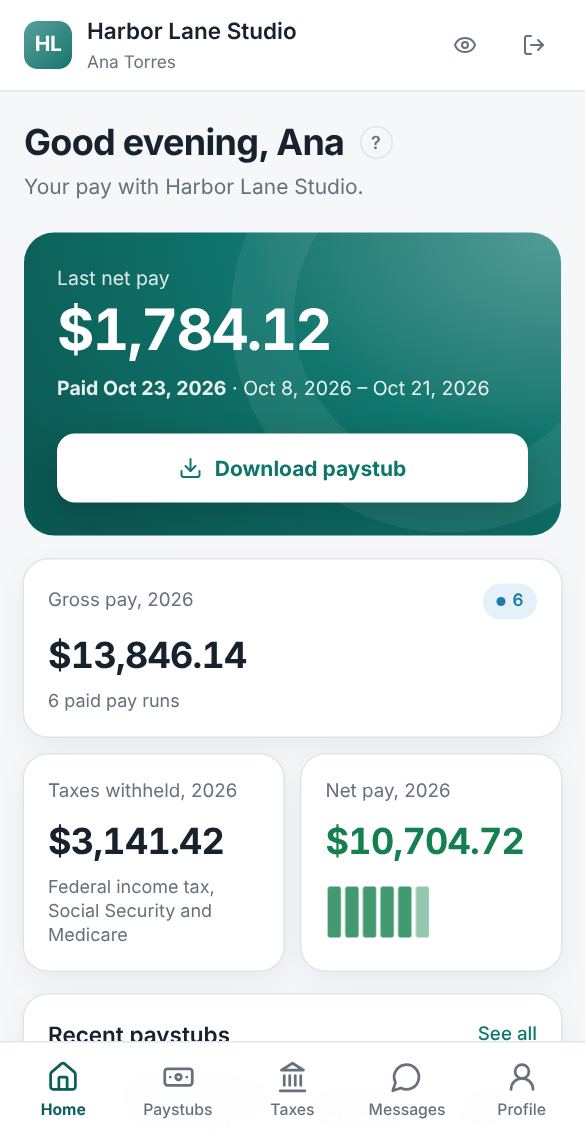
Home shows your Last net pay, the date it was paid and its pay period, with Download paystub. Under it are your gross pay, taxes withheld (federal income tax, Social Security and Medicare, and state taxes) and net pay for the year, and your recent paystubs.
Paystubs
Paystubs lists every paid pay run, newest first, one year at a time, with the year's totals. Each row shows the pay date, the pay period, gross pay, taxes and net pay. Select Download for the paystub as a PDF. The PDF lists each tax on its own line, including any state income tax and state items such as paid leave.
Profile
Your Profile shows:
- Name, as payroll has it. It is read-only; ask payroll to change it.
- Phone and home address, printed on your paystubs and W-2. Changes save straight away, and payroll is told.
- Tax withholding (W-4): the W-4 answers payroll uses now. See below.
- Social Security number: only its last four digits. See below.
Changing your W-4
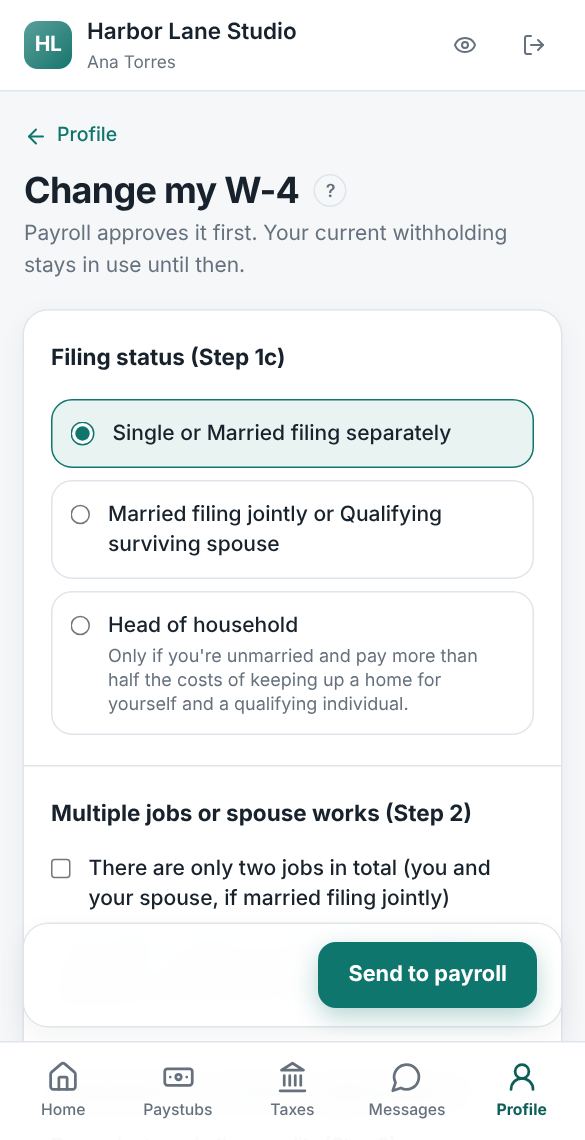
- In Profile, select Change my W-4.
- Fill in the Form W-4 steps: filing status (Step 1(c)), the multiple-jobs box (Step 2), dependents and other credits (Step 3), and other income, deductions and extra withholding each pay (Step 4). Each step has the IRS's short explanation, and IRS Form W-4 instructions opens the full ones. In Spanish, the form follows the IRS Formulario W-4(SP).
- Sign by typing your full name, then select Send to payroll.
Payroll approves every change before it is used; until then your current withholding stays in use, and Profile shows the change as waiting. You can Cancel request while it waits, and sending a newer W-4 replaces it. If payroll doesn't approve it, the reason shows on your Profile.
Your Social Security number
Your W-2 needs your Social Security number. In Profile, select Add my number (or Change my number), type the nine digits and select Send to payroll. Payroll approves it before it is used. You can cancel it while it waits, and if it isn't approved the reason is shown. For your safety, the portal only ever shows the last four digits.
Tax forms and your W-2
Tax forms is where you get your W-2. By default it comes on paper. To get it online only:
- Read how online delivery works: it covers every W-2 from your employer, starting with the next one, until you withdraw.
- Check I can open and print PDF files on this device, and type your full name.
- Select Agree, get my W-2 online.
When payroll approves your W-2, by January 31, it appears here to download (Copies B, C and 2, for your tax return and records) and you get an email. You can select Withdraw, send me paper at any time, and you can always ask payroll for a paper copy.
Questions about your pay
Use Messages, or Message payroll in the menu, to write to your employer's payroll team about your pay, a paystub or your W-4. You have one conversation, Payroll. See Messages.